Q-Align: Teaching LMMs for Visual Scoring via Discrete Text-Defined Levels
See you in ICML 2024, Vienna (Wed 24 Jul 1:30 a.m. CET — 3:00 am CET)
Yixuan Gao2,
Annan Wang1,
Erli Zhang1,
Wenxiu Sun3,
Qiong Yan3,
Xiongkuo Min2,
Guangtao Zhai2#,
Weisi Lin1#
1Nanyang Technological University, 2Shanghai Jiao Tong University, 3Sensetime Research
*Equal contribution. +Project Lead. #Corresponding author(s).
**The retrained version on Qwen3.5-VL can be found at [Q-ReAlign](https://github.com/Q-Future/Q-ReAlign)**
## [New Update]
1. We propose the first models (Q-SiT, Q-SiT-mini) that can deal with both image quality scoring and interpreting tasks. See more details [here](https://github.com/Q-Future/Q-SiT).
2. **We release the new version of Q-Align, [Q-ReAlign](https://github.com/Q-Future/Q-ReAlign), which is trained on modern VLMs and gains the same performance with 50% fewer parameters.**
## [Important Note!] v1.1 <-> transformers==4.36.1+
This LLaVA-style repository has been built on `transformers==4.31.0`, which is incompatible with many new models available on Hugging Face. This requires to build a separate environment for the MLLM/LMM repository, which is somewhat troublesome for this **visual scoring** model, as we expect the **Q-Align/OneAlign** to effectively boost other disciplines (image/video generation, *etc*). Both the repository and the **AutoModel** (as follows) are updated to the newest version.
To this end, we have modified respective code for mPLUG-Owl2 to adapt it to the newest transformer version, i.e. `transformers==4.36.1`, so that you do not need to create a separate outdated environment while using it alongside other projects. The updated code is no longer compatible with the old-version Q-Align (v1.0.1/v1.0.0, and before), please update to the newest version via the following scripts:
```shell
git pull
pip install -e .
```
## [Installation Free!] Quicker Start with Hugging Face AutoModel
No need to install this GitHub repo.
```python
import requests
import torch
from transformers import AutoModelForCausalLM
model = AutoModelForCausalLM.from_pretrained("q-future/one-align", trust_remote_code=True,
torch_dtype=torch.float16, device_map="auto")
from PIL import Image
model.score([Image.open(requests.get("https://raw.githubusercontent.com/Q-Future/Q-Align/main/fig/singapore_flyer.jpg",
stream=True).raw)], task_="quality", input_="image") # task_ : quality | aesthetics; # input_: image | video
```
This model also supports to be instantialized via latest [IQA-Pytorch](https://github.com/chaofengc/IQA-PyTorch) (quick install by `pip install git+https://github.com/chaofengc/IQA-PyTorch.git`):
```python
import pyiqa
import torch
qalign = pyiqa.create_metric('qalign').cuda()
quality_score = qalign(input, task_='quality')
aesthetic_score = qalign(input, task_='aesthetic')
```
## Installation
If you only need to infer (or evaluate):
```shell
git clone https://github.com/Q-Future/Q-Align.git
cd Q-Align
pip install -e .
```
For training, you need to further install additional dependencies as follows:
```shell
pip install -e ".[train]"
pip install flash_attn --no-build-isolation
```
## Quick Start
We have fixed the multi-GPU inference problem.
### Image Quality Scorer
- CLI Interface
```shell
export DEFAULT_IMG_PATH=fig/singapore_flyer.jpg
python q_align/evaluate/scorer.py --img_path $DEFAULT_IMG_PATH
```
- Python API
```python
from q_align import QAlignScorer
from PIL import Image
scorer = QAlignScorer()
img_list = [Image.open("fig/singapore_flyer.jpg")] # can be multiple images
print(scorer(img_list).tolist())
```
### Image Aesthetic Scorer
- CLI Interface
```shell
export DEFAULT_IMG_PATH=fig/singapore_flyer.jpg
python q_align/evaluate/scorer.py --img_path $DEFAULT_IMG_PATH --aesthetic --model-path q-future/one-align
```
- Python API
```python
from q_align import QAlignAestheticScorer
from PIL import Image
scorer = QAlignAestheticScorer()
img_list = [Image.open("fig/singapore_flyer.jpg"), Image.open("fig/boy_colorful.png")] # can be multiple images
print(scorer(img_list).tolist())
```
### Video Quality Scorer
- CLI Interface
```shell
export DEFAULT_IMG_PATH=fig/baby.mp4
python q_align/evaluate/scorer.py --img_path $DEFAULT_IMG_PATH --video --model-path q-future/one-align
```
- Python API
```python
from q_align import QAlignVideoScorer, load_video
scorer = QAlignVideoScorer()
video_list = [load_video("fig/baby.mp4")]
print(scorer(video_list).tolist())
```
## Training & Evaluation
### Get Datasets
Download all datasets needed together.
```python
import os, glob
from huggingface_hub import snapshot_download
snapshot_download("q-future/q-align-datasets", repo_type="dataset", local_dir="./playground/data", local_dir_use_symlinks=False)
gz_files = glob.glob("playground/data/*.tar")
for gz_file in gz_files:
print(gz_file)
os.system("tar -xf {} -C ./playground/data/".format(gz_file))
```
For LSVQ, (video quality dataset, optional), you can download as follows:
```python
import os, glob
from huggingface_hub import snapshot_download
snapshot_download("teowu/LSVQ-videos", repo_type="dataset", local_dir="./playground/data/lsvq/", local_dir_use_symlinks=False)
gz_files = glob.glob("playground/data/lsvq/*.tar.gz")
for gz_file in gz_files:
print(gz_file)
os.system("tar -xzf {} -C ./playground/data/lsvq/".format(gz_file))
```
### Evaluation
After preparing the datasets, you can evaluate pre-trained **OneAlign** as follows:
- Image Quality Assessment (IQA)
```shell
python q_align/evaluate/iqa_eval.py --model-path q-future/one-align --device cuda:0
```
- Image Aesthetic Assessment (IAA)
```shell
python q_align/evaluate/iaa_eval.py --model-path q-future/one-align --device cuda:0
```
- Video Quality Assessment (VQA)
```shell
python q_align/evaluate/vqa_eval.py --model-path q-future/one-align --device cuda:0
```
See our [model zoo](./model_zoo) for all available models that you can use.
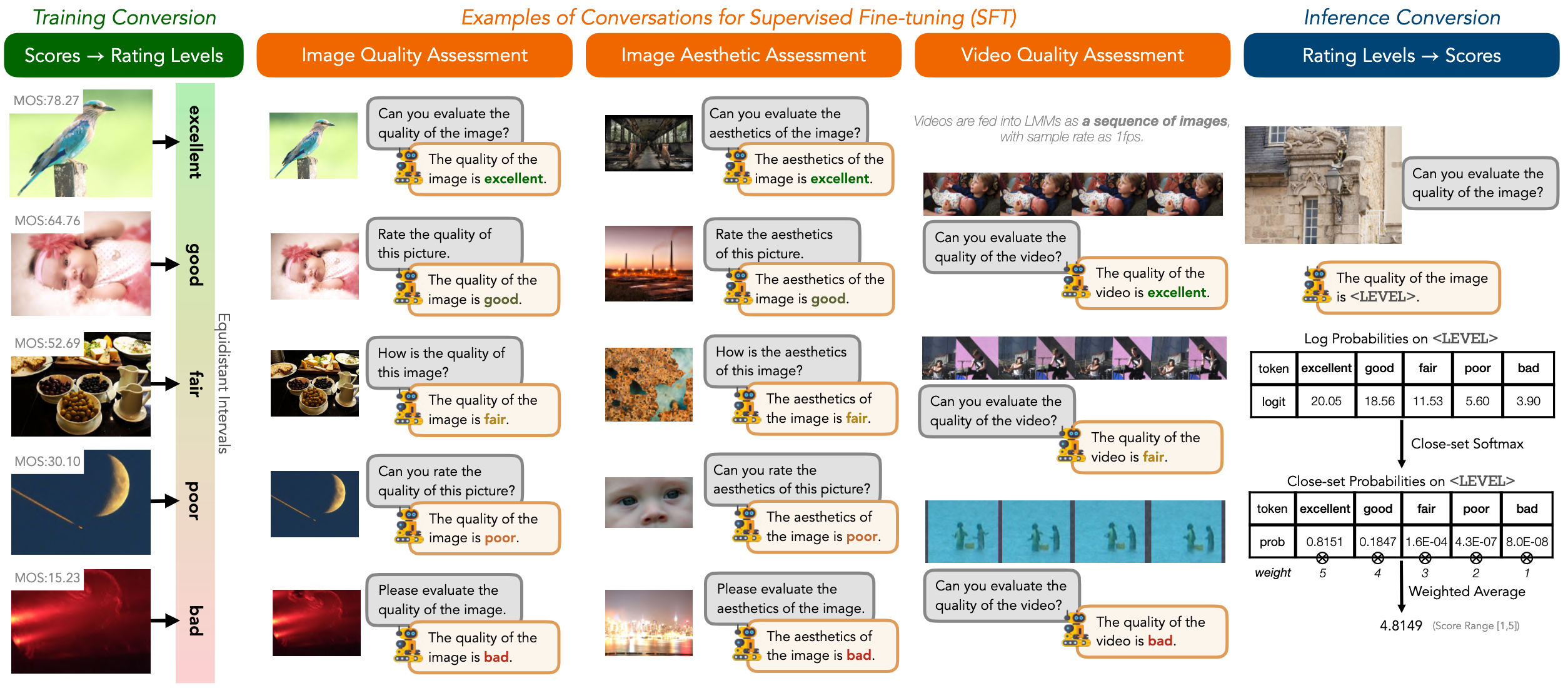
To convert output logits to scores, you may follow the simplest code below:
```python
import numpy as np
def wa5(logits):
logprobs = np.array([logits["excellent"], logits["good"], logits["fair"], logits["poor"], logits["bad"]])
probs = np.exp(logprobs) / np.sum(np.exp(logprobs))
score = np.inner(probs, np.array([5,4,3,2,1]))
return score
```
### LoRA Fine-tuning on *OneAlign*
See [LoRA Fine-tuning Instruction](./lora_finetune). It only requires **2 RTX3090 GPUs**.
### Full Training from Start
#### Image Quality Assessment
- Training Q-Align with KonIQ-10k:
```shell
sh scripts/l1_koniq.sh
```
- Training Q-Align with mixture of KonIQ-10k, SPAQ, and KADID-10k:
```shell
sh scripts/iqa_mix.sh
```
#### Image Aesthetic Assessment
- Training Q-Align Aesthetic Predictor with AVA dataset:
```shell
sh scripts/l1_ava.sh
```
#### Video Quality Assessment
- Training Q-Align Aesthetic Predictor with AVA dataset:
```shell
sh scripts/l1_lsvq.sh
```
*At least 4\*A6000 GPUs or 2\*A100 GPUs will be enough for the training.*
#### *OneAlign*
- Training OneAlign with IQA datasets, AVA dataset (IAA) and LSVQ dataset (VQA):
```shell
sh scripts/onealign.sh
```
*At least 8\*A6000 GPUs or 4\*A100 GPUs will be enough for the training.*
## Contact
Please contact any of the first authors of this paper for queries.
- Haoning Wu, haoning001@e.ntu.edu.sg, @teowu
- Zicheng Zhang, zzc1998@sjtu.edu.cn, @zzc-1998
## Acknowledgements
We sincerely thank Dr Weixia Zhang (@onionbao) and Dr Chaofeng Chen (@chaofenghust) for their assistance with experiments and advice on this project.
## Citation
```bibtex
@article{wu2023qalign,
title={Q-Align: Teaching LMMs for Visual Scoring via Discrete Text-Defined Levels},
author={Wu, Haoning and Zhang, Zicheng and Zhang, Weixia and Chen, Chaofeng and Li, Chunyi and Liao, Liang and Wang, Annan and Zhang, Erli and Sun, Wenxiu and Yan, Qiong and Min, Xiongkuo and Zhai, Guangtai and Lin, Weisi},
journal={arXiv preprint arXiv:2312.17090},
year={2023},
institution={Nanyang Technological University and Shanghai Jiao Tong University and Sensetime Research},
note={Equal Contribution by Wu, Haoning and Zhang, Zicheng. Project Lead by Wu, Haoning. Corresponding Authors: Zhai, Guangtai and Lin, Weisi.}
}
```
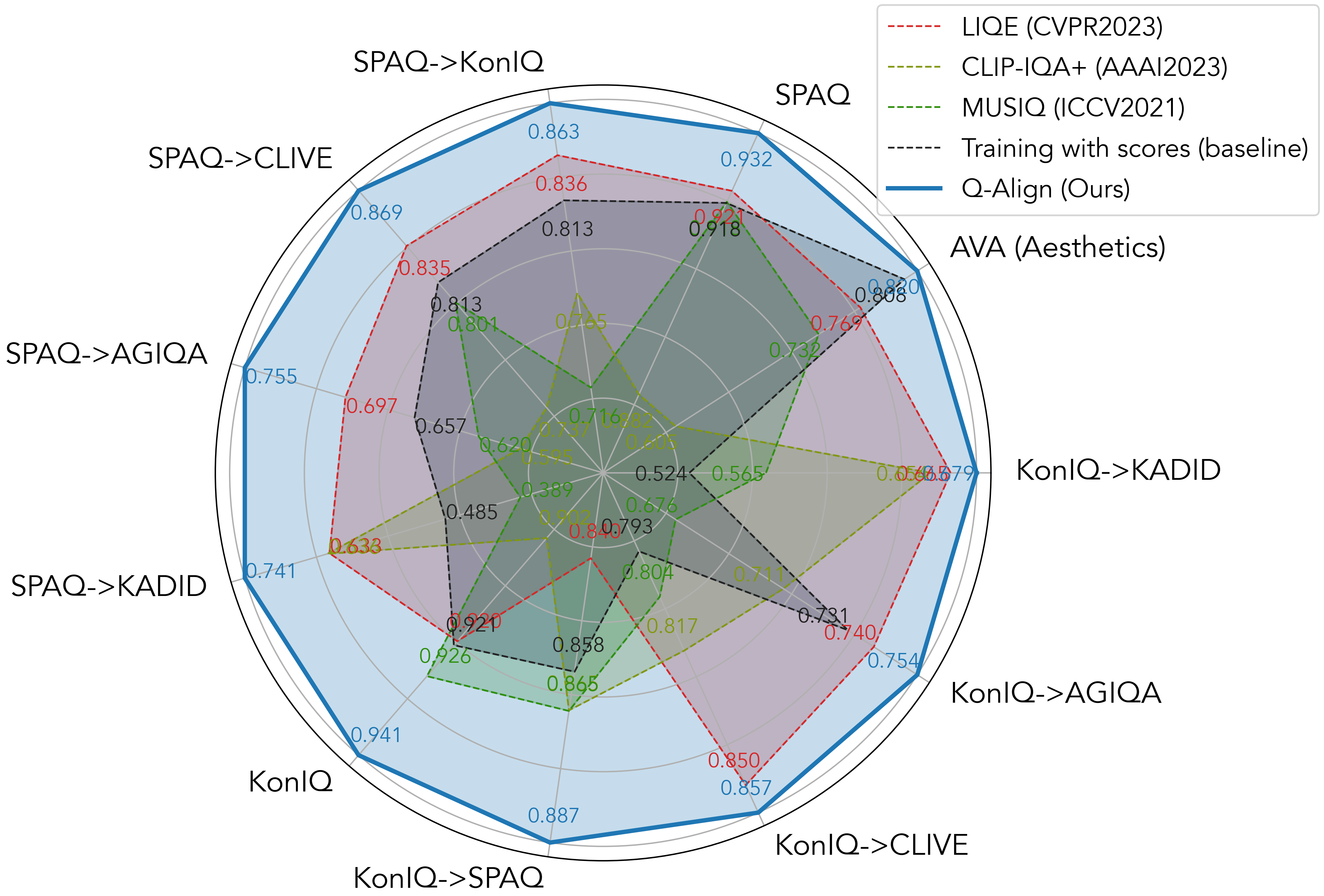
Results
Syllabus
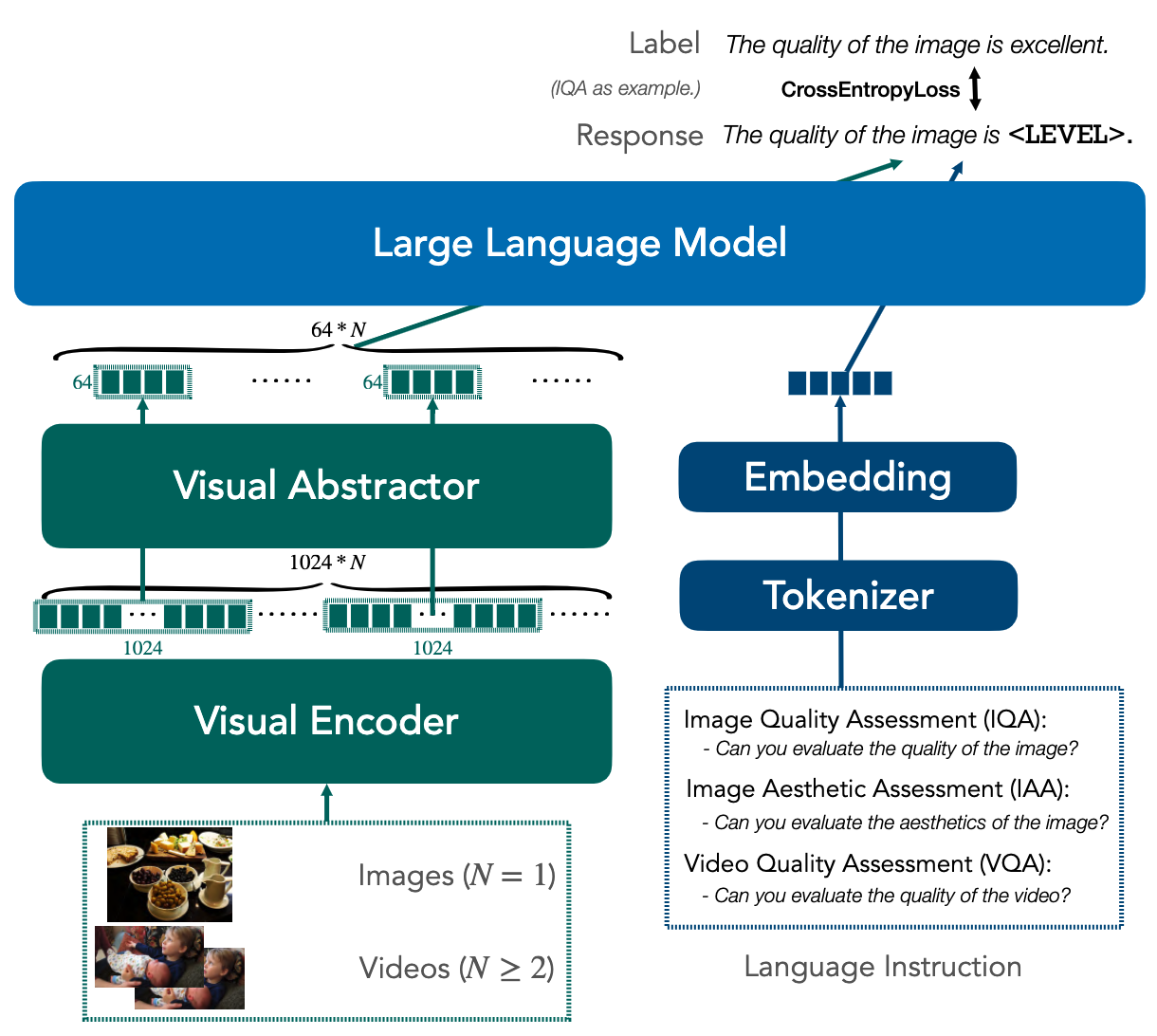
Structure